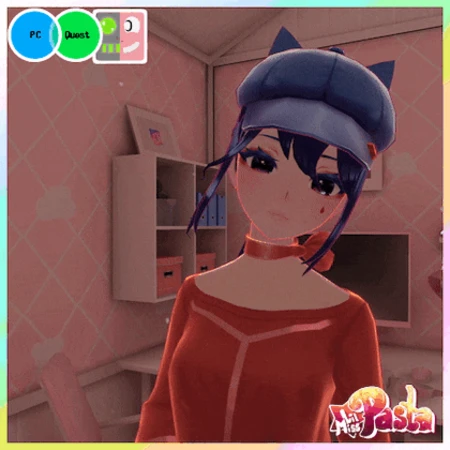
Мита из игры MiSide для Quest и FT (ПК)
FreeBuyМита из MiSide для VRChat! 10 образов, анимированная мимика, Face Tracking, GoGo Loco, интерактивные предметы. Поддержка PC и Quest.
- Updated
- October 26, 2026
- Size
- 705 kB
- Downloads
- 16
Description
LMP's Mita was made with permission from Team AIHASTO staff - thank you AIHASTO for making such an amazing game!
"Let's cook! Just don't look in the oven, k~ "

PC and Quest features:
❤️ Custom animated face expressions
🧡 10 total Mitas in 1 avi!
💛 Chibi Mita with matching accessories and FT
💚 Eye pokes, boops and headpats
💜 FBT ready, with Gogo Loco setup
❤️ Pre-installed GoGo Loco
🧡 Stir and sip Sleepy Mita's coffee
💛 Game accurate text system
PC only features:
❤️ Catch a ride on Leg Mita
🧡 Audiolink
💛 Push up Mila's glasses for a glare effect
💚 Realistic shoe/slipper movement
Don't want to deal with uploading?
Oven System (PC + Quest)
-Place oven down, then open it completely to spawn a chainsaw!
-Grab the chainsaw with your right hand, and make a fist gesture to pick it up.
-You can grab the handle with your opposing hand, and the chainsaw is turned on by making a fist gesture with your right hand and pulling the trigger.
- Hitting others or yourself with the chainsaw will make you bloody! (PC)

Knife System (PC + Quest):
-Similarly to the chainsaw, makes you bloody when used (PC)
-Swap hands by making fingerguns with the hand you want the knife in.
-To swap between front and back grip, make a fist with the hand holding the knife and pull your trigger.
Text System (PC + Quest):
-The text system can be used either directly in your menu, or with the button panel.
-Pulling the cartridge out of the button panel will disable it.
-The color of the text changes depending on which Mita is talking, just like in the game!


Cappie's guitar (PC):
-To play Cappie's guitar, first change into Cappie and flip in around in your radial menu. Then grab the neck of the guitar with your left hand, and strum with your right hand!
-The pitch of the guitar depends on where your left hand is on the fret board. Cappie's guitar covers one full scale, from lower C to upper C.
Duckie (PC + Quest):
-Squishing the rubber duck makes it squeak!
-Changing into Leg Mita will lower this and the soda accessory to the correct height.
Chibi Mita (PC + Quest):
-Chibi Mita can run around using the controller in your radial menu.
-She can be picked up, but will not be happy about it!
-Chibi Mita changes accessories to match various of the larger Mitas automatically.
-Chibi Mita is super expressive, and even has her own face tracking setup!

Sleepy Mita's Coffee (PC + Quest):
-You can stir the coffee with the spoon in the mug (PC), and both you and others can sip from it
-You can continue to play with the spoon after your mug is empty, or re-fill for another cuppa!

...And so much more!
Stats:

Upload size: 8 MB
Before downloading, please ensure that you have:
Unity 2022.3.22f1
VRChat Creator Companion (VCC, VRChat website)
Poiyomi Toon 9.0.61
Additionally, please have basic knowledge of how to upload an avatar to VRChat.
PC upload Instructions:
-
Create a new Unity Avatar project using VCC, and log into the SDK
-
Import Poiyomi Toon 9.0.61
-
Import the Mita PC Avatar Package
-
Open the "OPEN ME" scene in the Mita folder
Ready to upload!
Quest upload instructions:
-
Create a new Unity Avatar project using VCC, and log into the SDK
-
Import the Mita Quest Avatar Package
-
Open the "OPEN ME" scene in the Mita folder
-
Remember to Copy/paste the blueprint ID from your PC upload to this one, for the fallback to sync
Ready to upload!
By downloading this product, you agree to the following terms:
You are not allowed to:
★ Distribute the avatar or parts of the avatar and assets to others
★ Publish the avatar as a public model on VRChat
★ Claim the avatar or assets as your own
★ Re-sell the avatar or its parts in its original or edited state
★ Rip parts of the model for use on other projects
You are allowed to:
★ Use the avatar for streaming or creating content, provided credit for the model is given
★ Make edits of the avatar for personal use
Credits:
A special thank you to Team AIHASTO for allowing me to make use of their IP and game assets for this project! Please check out their game MiSide, it's genuinely so much fun!
LMP's Mita is a fan-made avatar, not an official AIHASTO project, and I (LMP) am not affiliated with AIHASTO.
Thank you to the incredibly talented Biocall and Premoo for helping me capture the very best sides of my avatar, and to JellyCube for their immense help with setting up face tracking! I couldn't have done this without you <3
Отзывы покупателей
 NugetManOctober 26, 2026
Очень хорошо сделано, 1 в 1 как в игре
 SystemOctober 26, 2026
Норм